1. Introduction
The QA Module in our portal is designed to help businesses manage and resolve customer complaints systematically. It provides a structured workflow to track, analyse, and solve issues efficiently, ensuring continuous improvement in product and service quality.
A key feature of this module is the 8D (Eight Disciplines) Problem-Solving Process, a structured approach used to identify root causes, implement corrective actions, and prevent recurrence of issues.
2. QA Module Overview
The QA Module consists of four key sections that enable effective complaint tracking and resolution:
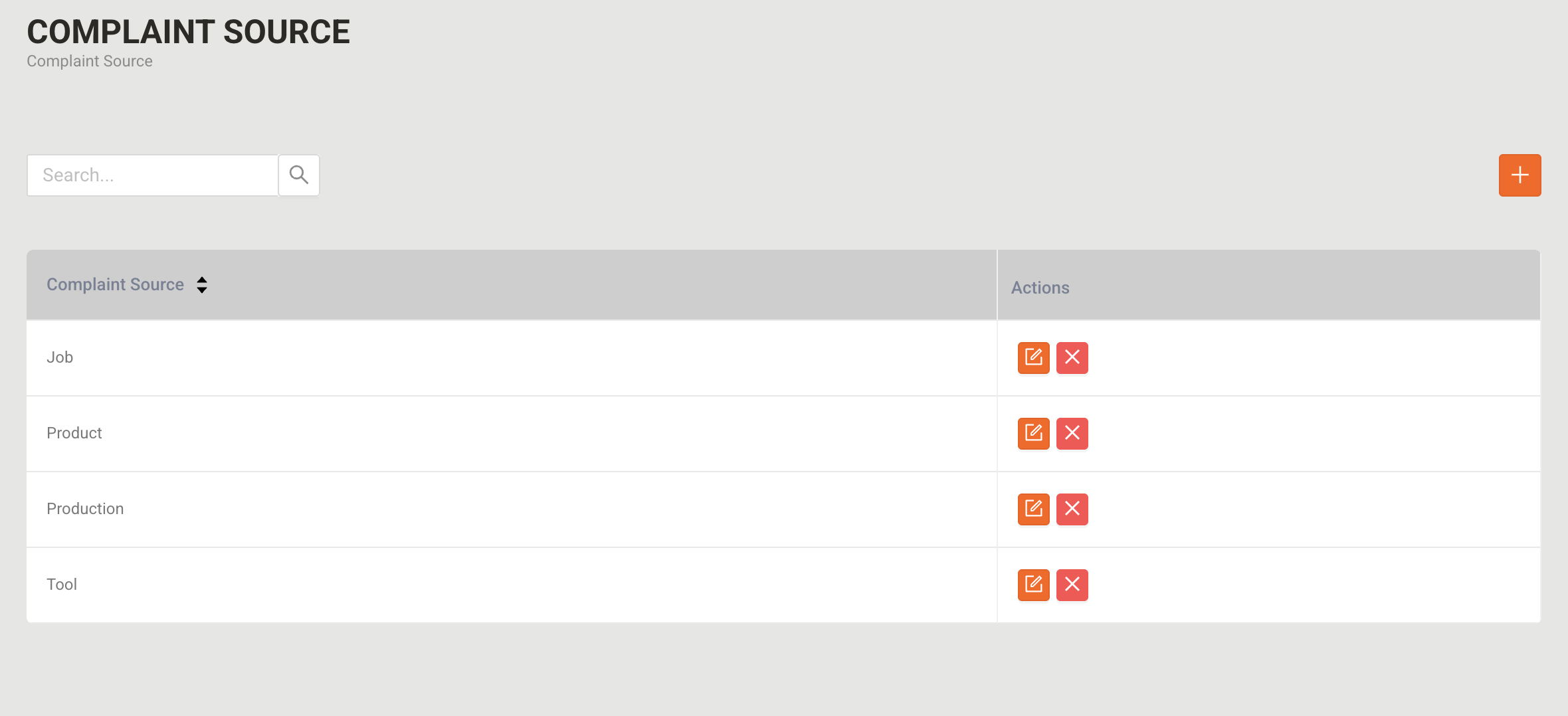
2.1 Complaint Source
This section categorises the origins of complaints, helping in trend analysis and problem identification.
Features:
- Add, edit, view, and delete complaint sources.
Examples of Complaint Sources:
- Job-related issues – Incorrect work instructions, missing documentation
- Product defects – Damaged goods, faulty components
- Production errors – Machine failure, incorrect assembly
- Tooling issues – Broken tools, incorrect settings
- Customer feedback – Complaints received from customers
2.2 Containment Actions
Containment actions are temporary measures taken to control the impact of an issue while a permanent solution is being developed. These actions ensure that defective products or faulty processes do not continue affecting customers or production.
2.2.1 Action Matrix
Purpose
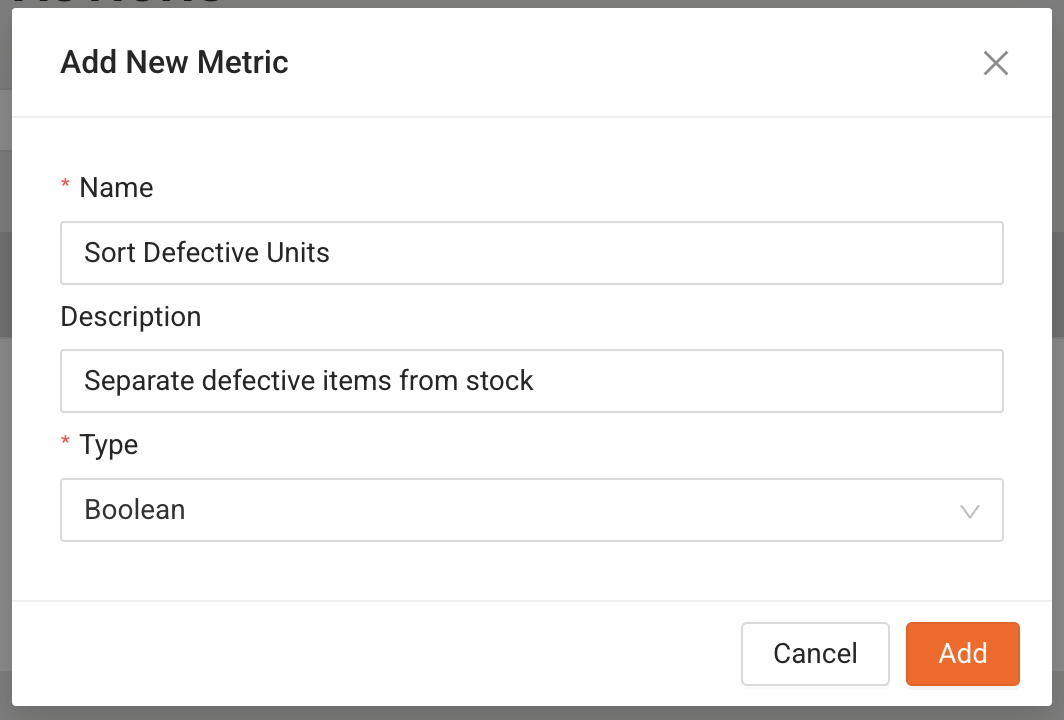
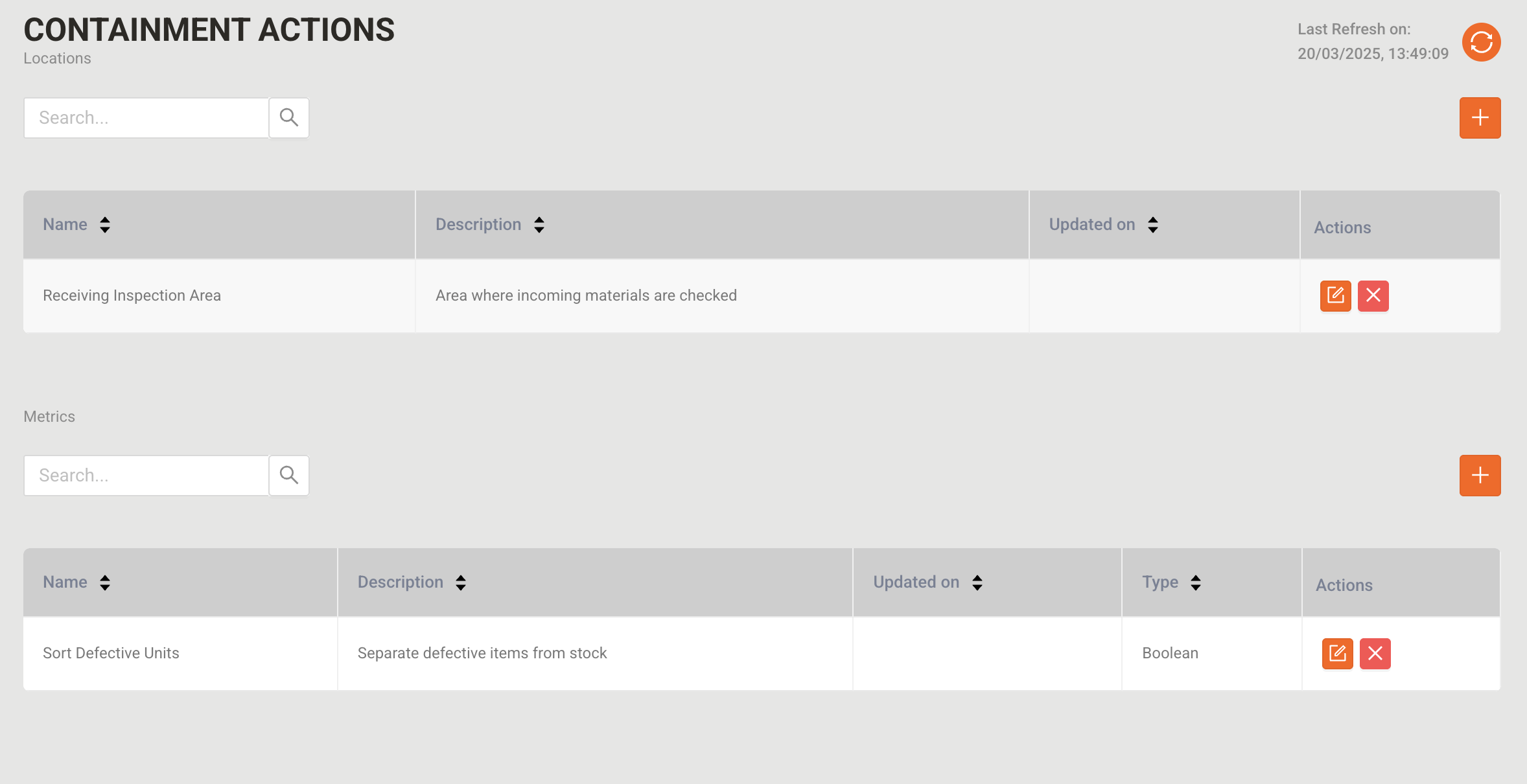
The Action Matrix allows users to define specific actions that must be taken to contain an issue. Each action is associated with a name, description, and type to help categorise and measure containment efforts effectively.
Fields in Action Matrix:
- Name → The title of the action (e.g., "Inspect Defective Items").
- Description → A brief explanation of the action (e.g., "Inspect all units in Batch #123 for dimensional accuracy.").
- Type→ Defines the data format:
- Boolean (Yes/No) – Used when an action has a binary state (e.g., "Was rework required? Yes/No").
- Number – Used when a numerical value is required (e.g., "Number of defective units identified").
Example of an Action Matrix Entry
Name | Description | Type |
Sort Defective Units | Separate defective items from stock | Boolean (Yes/No) |
Measure Defect Rate | Calculate the percentage of defects in production | Number |
Check Packaging Integrity | Ensure all packaging is intact before shipping | Boolean (Yes/No) |
Rework Defective Items | Count the number of items that require rework | Number |
2.2.2 Location Management in Containment Actions
Purpose
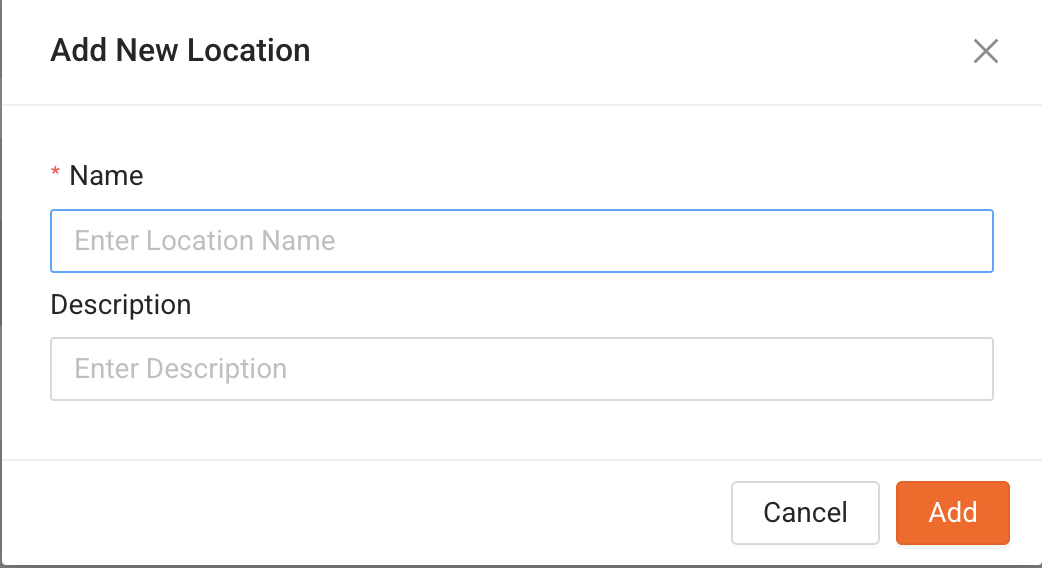
The Location field allows users to specify where a containment action is being applied. Different locations may require different containment strategies depending on where the issue has occurred.
Fields in Location Module:
- Name → The specific location where containment is being applied (e.g., "Assembly Line A").
- Description → Details about the location (e.g., "Final inspection area for completed products").
Example of Locations in Containment Actions
Name | Description |
Receiving Inspection Area | Area where incoming materials are checked |
Warehouse Section B | Storage location for finished goods |
Assembly Line A | Where products are assembled before final checks |
Packaging Unit | Location for packing and labeling finished goods |
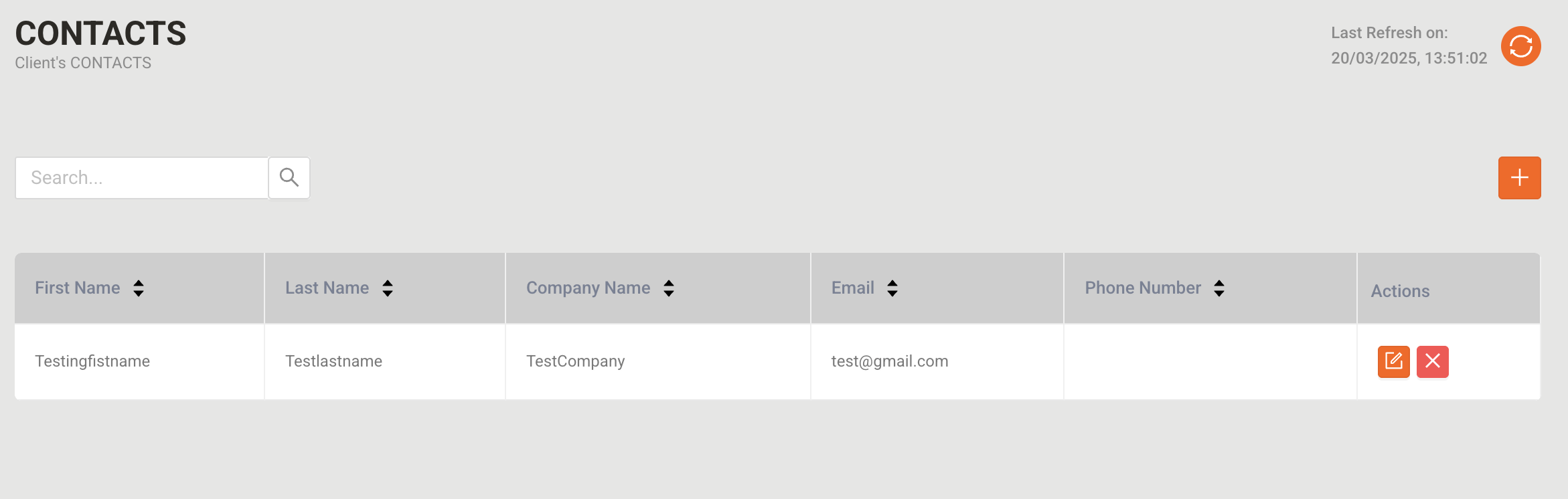
2.3 Customers
This section manages all customer-related information.
Features:
Add, edit, view, and delete customer records
- Maintain detailed information such as:
- First Name & Last Name
- Company Name
- Email & Phone Number
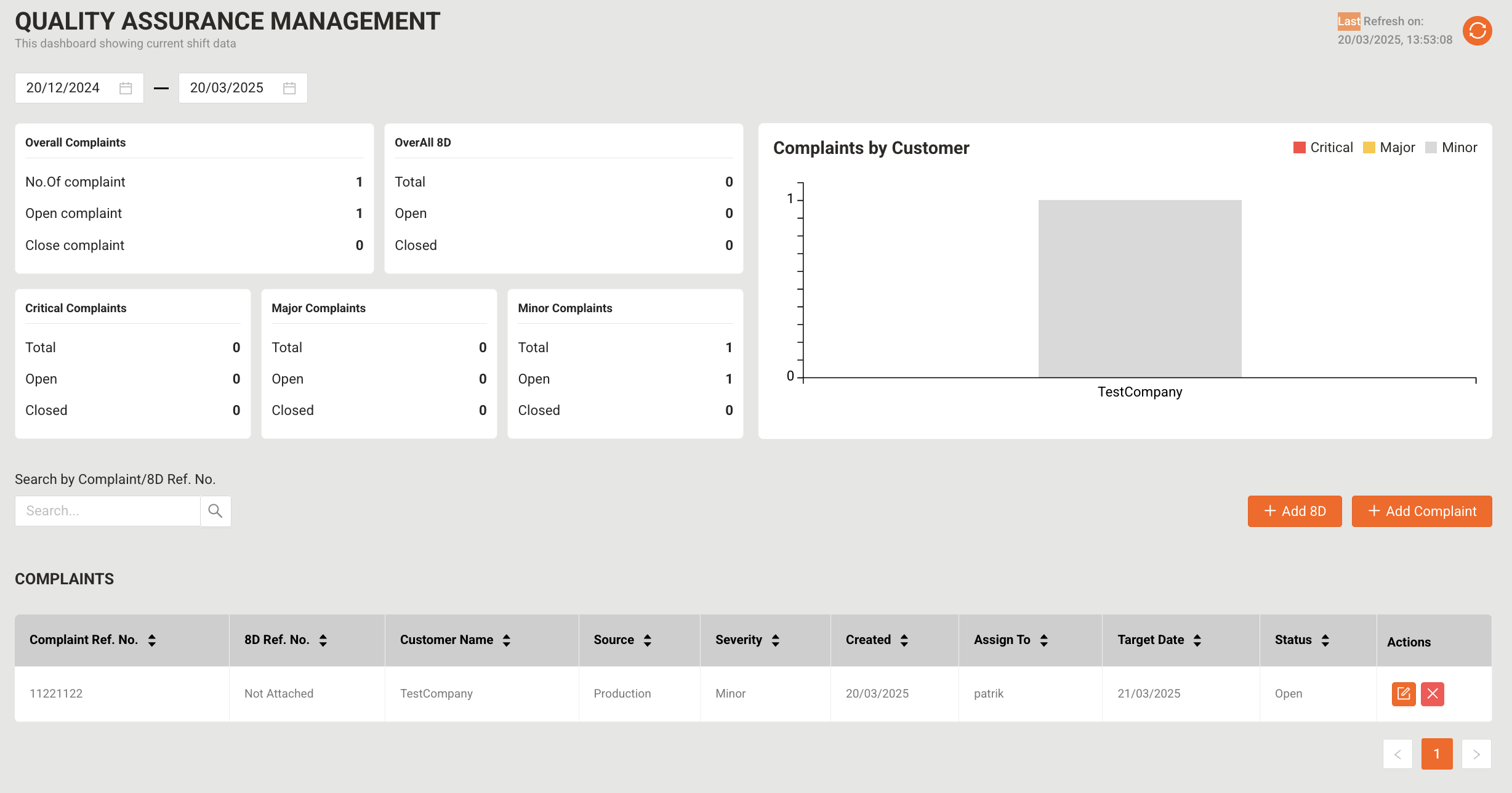
2.4 Complaint Management (Dashboard)
The complaint dashboard provides an overview of reported complaints, including their severity and key performance indicators (KPIs).
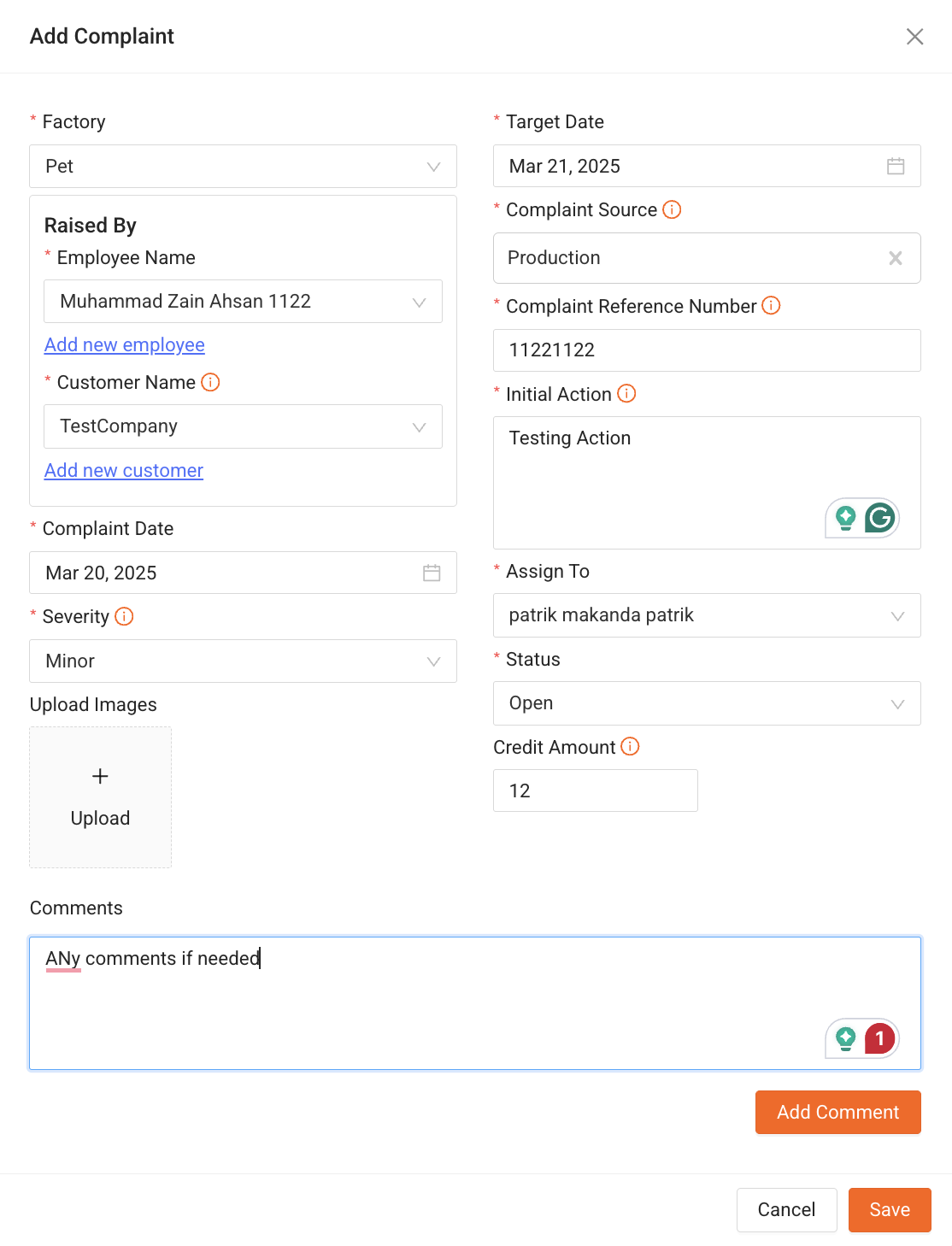
Complaint Submission Fields:
Field | Description |
Factory | Select the relevant factory |
Raised By | Select/Search Employee or Add New |
Customer Name | Select/Add New Customer |
Complaint Date | Date complaint was reported |
Severity | Choose from Low, Medium, High |
Upload Images | Attach relevant images |
Target Date | Deadline for resolution |
Complaint Source | Identify the root cause category |
Complaint Reference Number | Unique ID for tracking |
Initial Action | Immediate response to the issue |
Company Name | Associated company |
Assign To | Select responsible employee/team |
Status | Pending, In Progress, Resolved |
Credit Amount | Enter compensation amount (if applicable) |
Comments | Add any additional details |
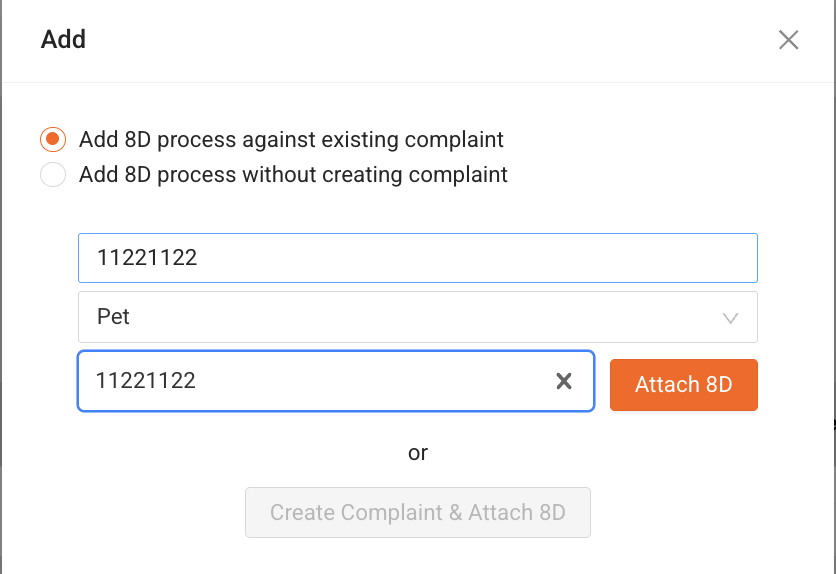
Once a complaint is added, it can be processed using the 8D problem-solving methodology to ensure proper resolution.
3. 8D Problem-Solving Process
The 8D methodology is a structured approach designed to identify, analyse, and resolve problems effectively.
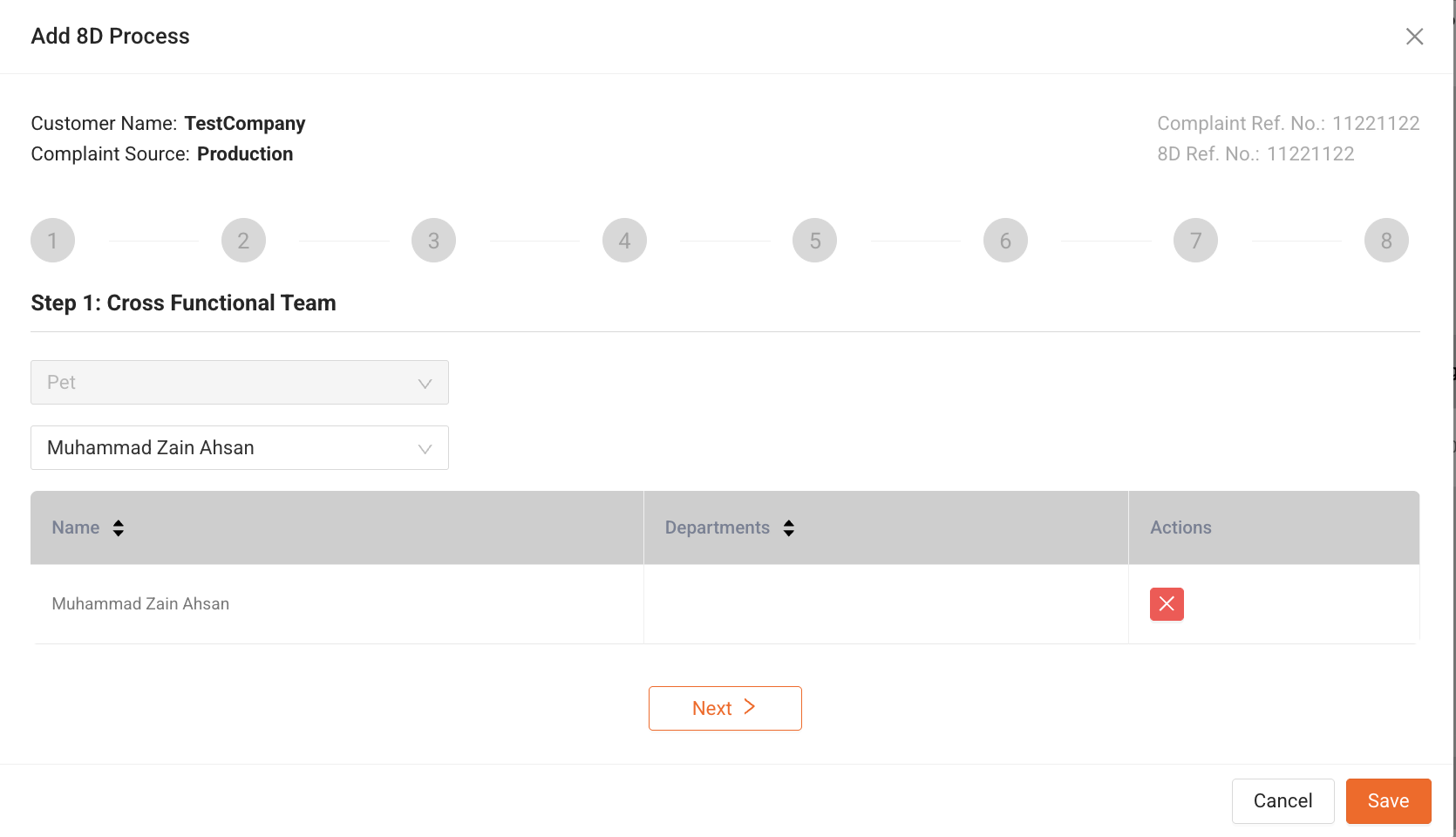
Step 1: Form a Team (D1)
Assemble a cross-functional team with relevant expertise.
Example:
A company experiencing frequent product defects creates a team of:
- Production Manager (operations expert)
- Quality Control Expert (ensures standards)
- Design Engineer (product knowledge)
- Supplier Representative (material quality)
Step 2: Define the Problem (D2)
Purpose:
In this step, the problem must be clearly defined using factual data. A well-defined problem ensures that the team fully understands the issue before identifying the root cause and implementing solutions.
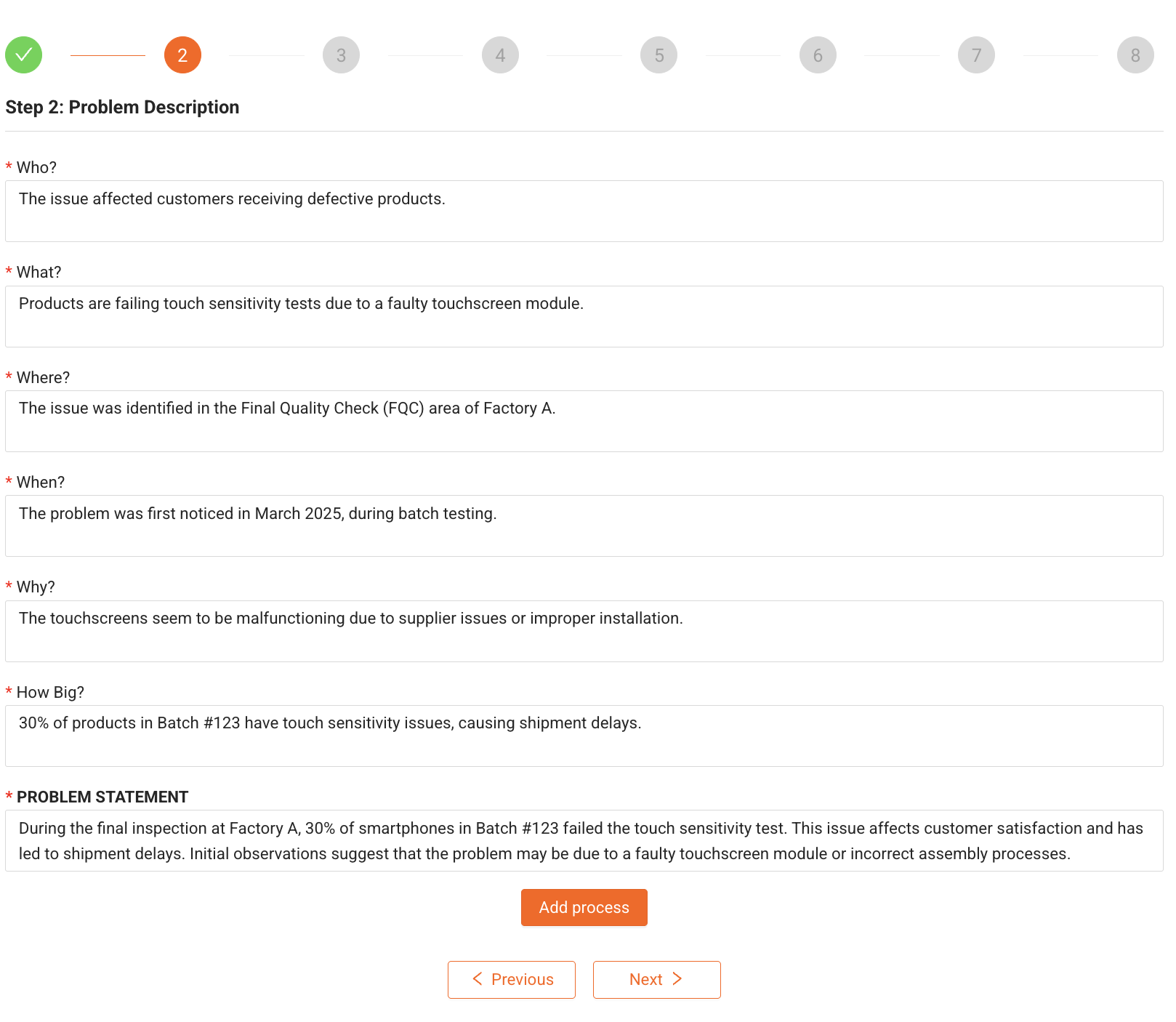
To define the problem effectively, we use the 5W2H (Who, What, Where, When, Why, How Big, and Problem Statement) approach.
Problem Description
Question | Description | Example |
Who? | Who did the problem affect? | The issue affected customers receiving defective products. |
What? | What is the problem? | Products are failing touch sensitivity tests due to a faulty touchscreen module. |
Where? | Where did the problem occur? | The issue was identified in the Final Quality Check (FQC) area of Factory A. |
When? | When did the problem occur? | The problem was first noticed in March 2025, during batch testing. |
Why? | Why did the problem occur? (Initial assumption) | The touchscreens seem to be malfunctioning due to supplier issues or improper installation. |
How Big? | How big is the problem? | 30% of products in Batch #123 have touch sensitivity issues, causing shipment delays. |
Problem Statement
A problem statement is a concise description of the issue that provides enough detail to guide the next steps in the 8D process.
Example Problem Statement:
"During the final inspection at Factory A, 30% of smartphones in Batch #123 failed the touch sensitivity test. This issue affects customer satisfaction and has led to shipment delays. Initial observations suggest that the problem may be due to a faulty touchscreen module or incorrect assembly processes."
Example Scenario: Defining the Problem
Scenario:
A car manufacturing company receives multiple complaints about steering vibrations in newly delivered vehicles.
Problem Definition (5W2H)
Question | Response |
Who? | Customers who purchased Model X vehicles |
What? | The steering wheel vibrates at high speeds |
Where? | Vehicles manufactured in Factory B, Assembly Line 2 |
When? | Complaints started in March 2025 |
Why? | Initial inspections show improper wheel alignment or faulty steering components |
How Big? | 20% of the manufactured vehicles show this issue, affecting 500+ units |
Problem Statement:
"Customers who purchased Model X vehicles manufactured in Factory B have reported excessive steering vibrations at speeds above 80 km/h. This issue affects 20% of vehicles in recent production and is causing an increase in customer complaints and warranty claims. Initial investigations suggest improper wheel alignment or defective steering components as possible causes."
Why Defining the Problem Clearly is Important
- Prevents miscommunication and confusion within the team
- Helps in identifying the real root cause instead of just treating symptoms
- Ensures that corrective actions are targeted and effective
- Saves time and resources by focusing on the right problem
Step 3: Implement Temporary Containment Actions (D3)
Purpose:
This step involves taking immediate actions to contain the problem and prevent it from affecting more products or customers. These are temporary measures used while the root cause is being investigated and a permanent solution is developed.
Interim Containment Actions
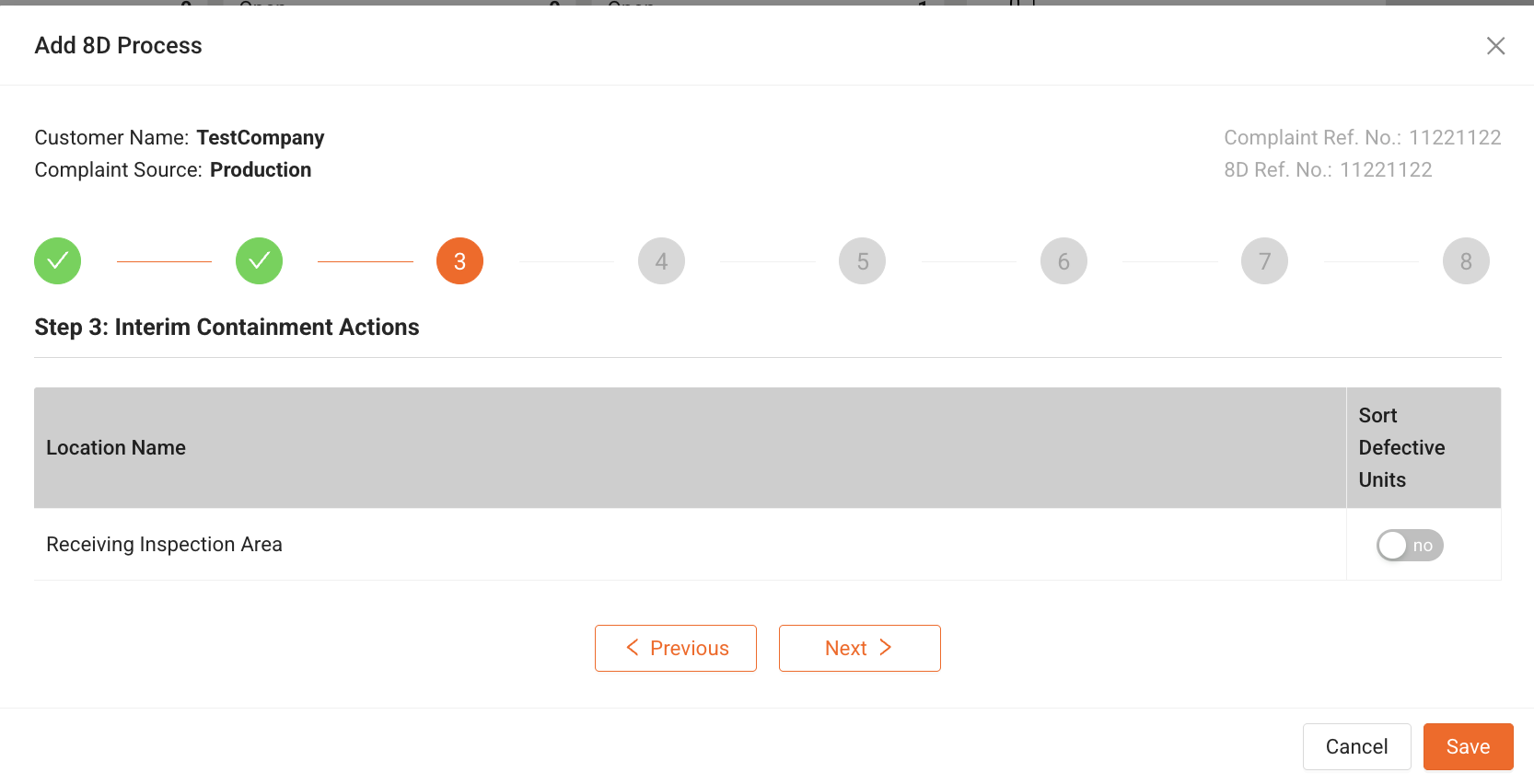
Containment actions depend on the nature of the problem and where it occurs. These actions are defined based on specific locations where defects are detected and actions that need to be taken.
Example Containment Actions Matrix
Location Name | Containment Action | Description |
Receiving Inspection Area | Sort Defective Units | Inspect incoming materials and separate defective parts. |
Production Line A | Hold Production | Stop assembly to prevent further defective products. |
Warehouse Section B | Isolate Affected Stock | Move defective units to a separate area to avoid shipping issues. |
Final Quality Check (FQC) | Additional Inspection | Increase testing frequency to detect more defects early. |
Customer Service Desk | Notify Affected Customers | Inform customers about potential delays and offer solutions. |
Example Scenario: Containment Actions in Action
Scenario:
A smartphone manufacturer discovers that 30% of devices in Batch #123 have touchscreen issues.
Step 1: Identify Locations for Containment
- Receiving Inspection Area → Check incoming touchscreens from the supplier.
- Assembly Line A → Halt production of new batches until the issue is resolved.
- Warehouse Section B → Separate defective stock to prevent accidental shipments.
- Final Quality Check (FQC) → Increase inspection for future batches.
- Customer Service Desk → Contact customers to manage expectations.
Step 2: Apply Containment Actions
Location | Containment Action | Action Description | Responsible Team |
Receiving Inspection Area | Sort Defective Units | Inspect incoming screens for defects before assembly. | Quality Control Team |
Production Line A | Hold Production | Stop the assembly of new devices until the issue is fixed. | Production Team |
Warehouse Section B | Isolate Affected Stock | Move defective products to a separate storage area. | Inventory Management |
Final Quality Check (FQC) | Increase Inspection | Double-check future batches to prevent defects. | QA Team |
Customer Service Desk | Notify Affected Customers | Inform customers about potential shipping delays. | Customer Support |
Why Temporary Containment Actions Are Important
Prevents Defective Products from reaching customers
Reduces Impact on production and shipments
Helps Identify Problem Areas quickly
Minimizes Financial & Reputation Losses
These actions buy time while the root cause is identified in Step 4: Identify the Root Cause (D4).
Step 4: Identify the Root Cause (D4)
Root Cause Analysis (RCA) is the process of identifying the underlying cause of a problem rather than just addressing its symptoms. This step ensures that the corrective actions in later steps eliminate the issue permanently rather than just temporarily fixing it.
Root Cause Identification Methods
The "5 Whys" Method
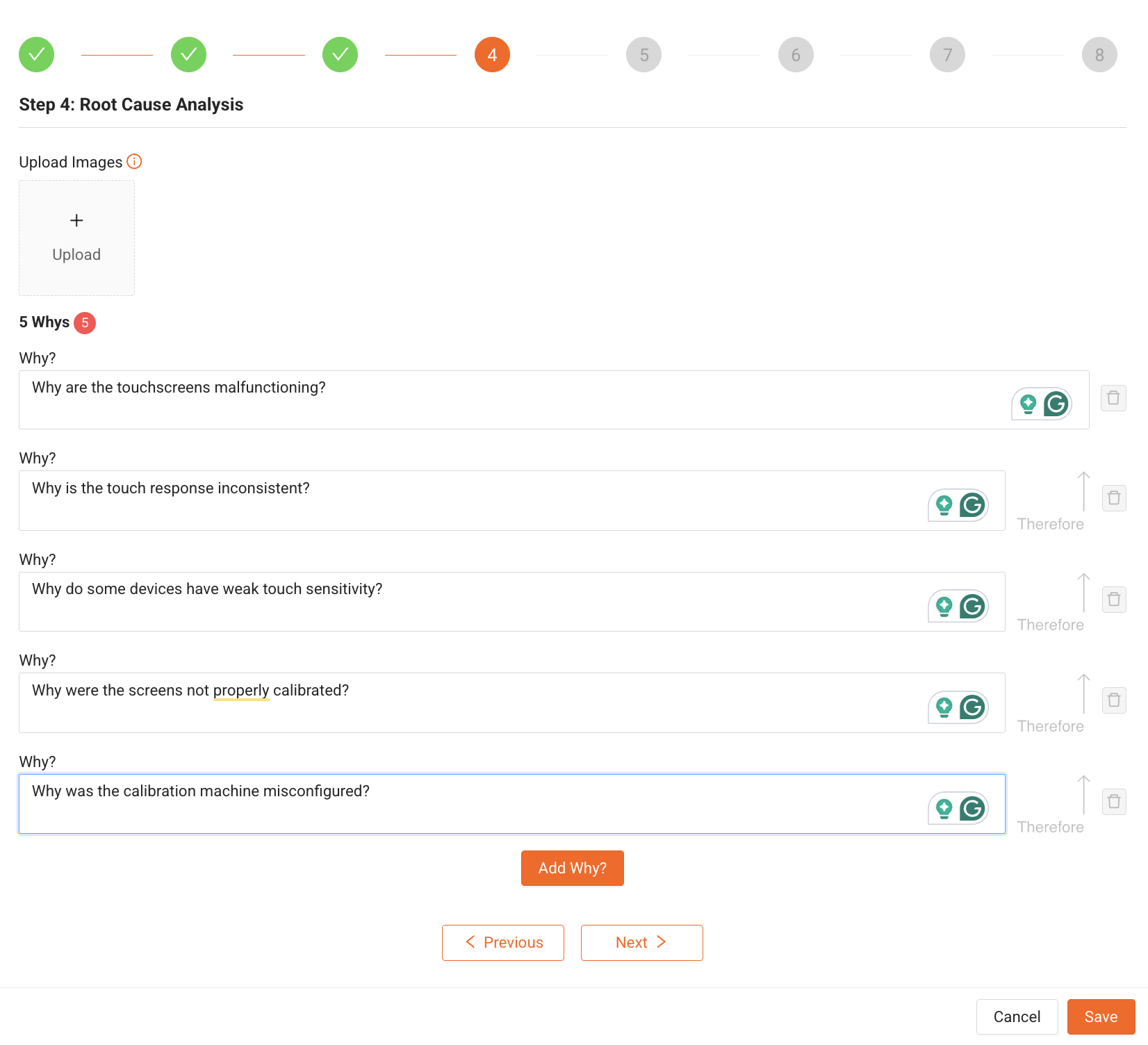
The 5 Whys technique is a simple but effective method for identifying the root cause of a problem by repeatedly asking "Why?" until the fundamental issue is revealed.
How It Works:
- State the problem.
- Ask "Why did this happen?"
- Continue asking "Why?" until the real cause is identified. (Usually, five iterations are sufficient, but more may be required.)
Example: Root Cause Analysis for a Smartphone Touchscreen Issue
Iteration | Question | Answer |
1st Why? | Why are the touchscreens malfunctioning? | The touch response is inconsistent. |
2nd Why? | Why is the touch response inconsistent? | Some devices have weak touch sensitivity. |
3rd Why? | Why do some devices have weak touch sensitivity? | The screens were not properly calibrated during production. |
4th Why? | Why were the screens not properly calibrated? | The calibration machine was misconfigured. |
5th Why? | Why was the calibration machine misconfigured? | There was no routine calibration check in the maintenance schedule. |
Root Cause:
Lack of a routine calibration check led to misconfigured machines, which caused improperly calibrated touchscreens.
Uploading Evidence & Images
To support RCA, the system allows users to upload images of defective products, machine logs, and test reports. These images can provide valuable insights when analysing the root cause.
Examples of uploaded evidence:
- Defective touchscreen samples
- Calibration machine logs
- Production process images
- Test reports showing the issue
Example: Applying RCA in a Real-World Scenario
A car manufacturing company receives complaints about steering vibrations in Model X vehicles.
5 Whys Analysis:
Iteration | Question | Answer |
1st Why? | Why is the steering vibrating? | The wheels are not properly aligned. |
2nd Why? | Why are the wheels not aligned? | The alignment process at the factory was skipped. |
3rd Why? | Why was the alignment process skipped? | The machine operator did not follow the alignment checklist. |
4th Why? | Why did the operator not follow the checklist? | The checklist was outdated and missing steps. |
5th Why? | Why was the checklist outdated? | There was no process to review and update standard operating procedures. |
Root Cause:
A lack of SOP updates led to outdated alignment procedures, causing steering vibration issues in vehicles.
Why Root Cause Analysis is Important?
- Prevents Recurrence – Fixes the real cause, not just the symptoms.
- Reduces Costs – Avoids repeated failures and warranty claims.
- Improves Processes – Strengthens quality control and production efficiency.
- Enhances Customer Satisfaction – Delivers consistent and defect-free products.
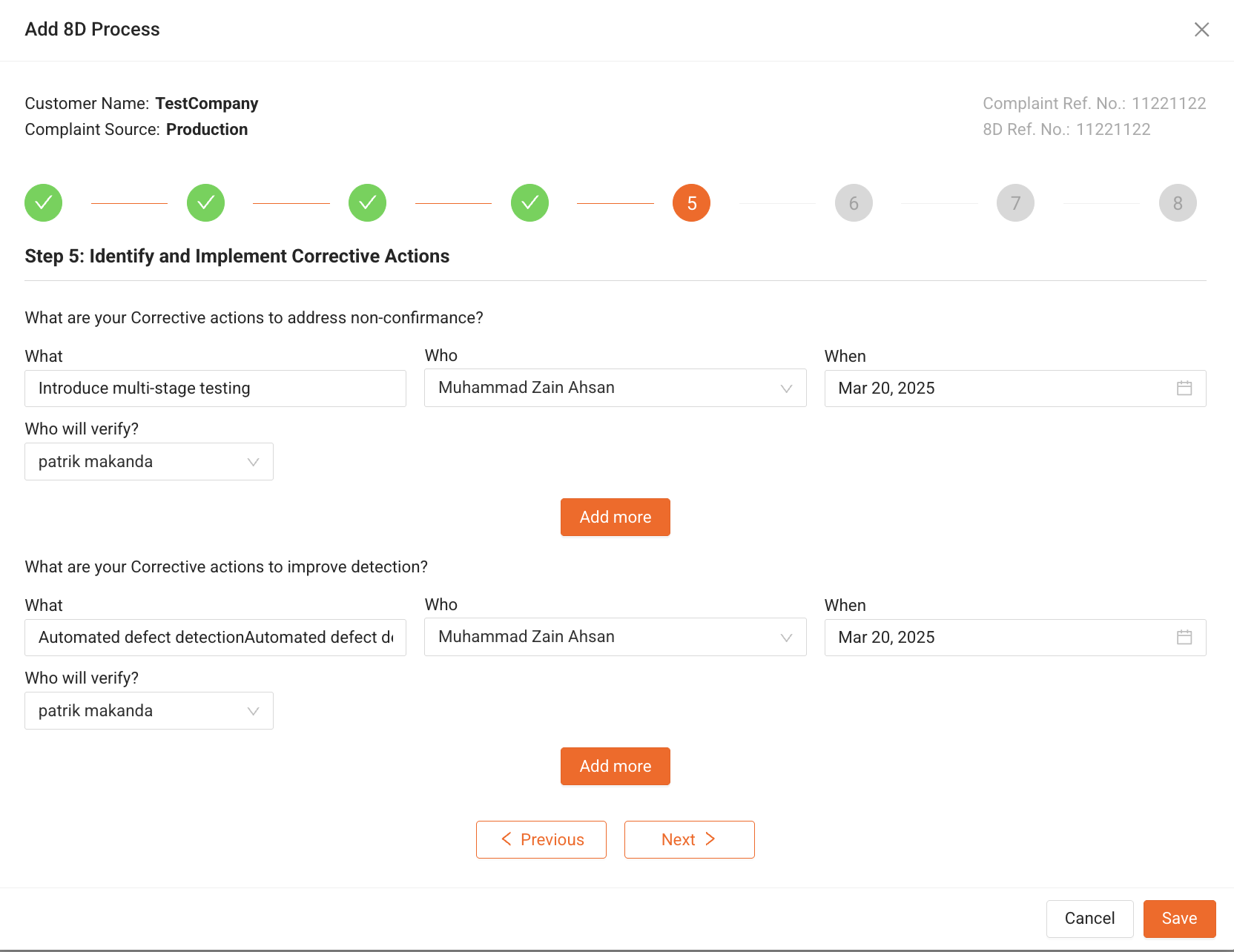
Step 5: Develop Permanent Corrective Actions (D5)
Once the root cause has been identified in Step 4, we must develop and implement corrective actions to eliminate the issue permanently and prevent it from recurring. Additionally, we implement detection improvement actions to catch similar issues earlier in the process.
Corrective Actions to Address Non-Conformance
Corrective actions are taken to eliminate the root cause of a problem. These actions directly address why the issue occurred and ensure it does not happen again.
Key Questions for Corrective Actions:
- What? → What action needs to be taken to fix the problem?
- Who? → Who is responsible for implementing the action?
- When? → By when should the action be completed?
- Who will verify? → Which manager or authority will confirm that the action has been properly implemented?
Example: Corrective Action for Touchscreen Issue
What? | Action Item | Who? | When? | Who will verify? |
Implement routine calibration checks | Update the maintenance schedule to include weekly calibration verification | Production Supervisor | March 20, 2025 | Quality Manager |
Supplier audit | Conduct an audit of touchscreen suppliers to ensure quality standards are met | Supply Chain Manager | March 25, 2025 | Quality Control Team |
Operator training | Train assembly line workers on proper touchscreen calibration | Training Manager | March 22, 2025 | Plant Manager |
Standard Operating Procedure (SOP) update | Modify SOPs to include mandatory touchscreen testing at multiple stages | Quality Engineer | March 24, 2025 | Production Head |
Corrective Actions to Improve Detection
Detection improvement actions enhance quality control processes so that similar issues can be detected earlier, preventing defective products from reaching customers.
Key Questions for Detection Improvement:
- What? → What action will be taken to improve defect detection?
- Who? → Who is responsible for implementing the action?
- When? → By when should the action be completed?
- Who will verify? → Who will confirm that the detection improvement is effective?
Example: Detection Improvement Actions for Touchscreen Issue
What? | Action Item | Who? | When? | Who will verify? |
Introduce multi-stage testing | Implement an additional touchscreen test after assembly | QA Engineer | March 20, 2025 | QA Manager |
Automated defect detection | Install AI-based visual inspection for touchscreens | Automation Lead | March 30, 2025 | Production Manager |
Employee performance tracking | Monitor defect detection rates per employee to identify training needs | HR & Quality Teams | March 25, 2025 | HR Manager |
Enhanced final inspection | Increase sample size for touchscreen quality testing before shipment | Quality Inspector | March 22, 2025 | Quality Control Team |
Example Scenario: Corrective Actions in a Car Manufacturing Issue
A car manufacturer finds steering vibrations in Model X vehicles due to misalignment issues caused by outdated procedures.
Corrective Actions to Address Non-Conformance
What? | Action Item | Who? | When? | Who will verify? |
Update alignment procedures | Revise SOPs to include a mandatory wheel alignment step | Production Engineer | March 21, 2025 | Quality Manager |
Training program | Train technicians on new alignment procedures | Training Manager | March 25, 2025 | Operations Head |
Equipment maintenance | Schedule weekly calibration of alignment machines | Maintenance Supervisor | March 22, 2025 | Plant Manager |
Corrective Actions to Improve Detection
What? | Action Item | Who? | When? | Who will verify? |
Implement automated alignment verification | Use laser-guided sensors to check alignment before vehicle delivery | R&D Team | March 30, 2025 | Production Manager |
Final road test enhancement | Add a high-speed road test to catch vibrations before delivery | QA Engineer | March 24, 2025 | QA Team |
Why Corrective Actions Matter?
- Prevents the problem from occurring again
- Reduces defect rates and rework costs
- Enhances quality control and detection systems
- Improves customer satisfaction and brand reputation
Step 6: Implement & Validate Corrective Actions (D6)
After implementing the corrective actions identified in Step 5, it is crucial to verify that they have been successfully executed and that they are effectively eliminating the problem. This step ensures that the root cause is permanently addressed and does not reoccur.
Verification Process
Each corrective action must be:
- Implemented correctly – The assigned person must confirm the completion of the task.
- Monitored for effectiveness – The corrective action should prevent recurrence of the issue.
- Verified and approved – A responsible manager must check if the issue has been fully resolved.
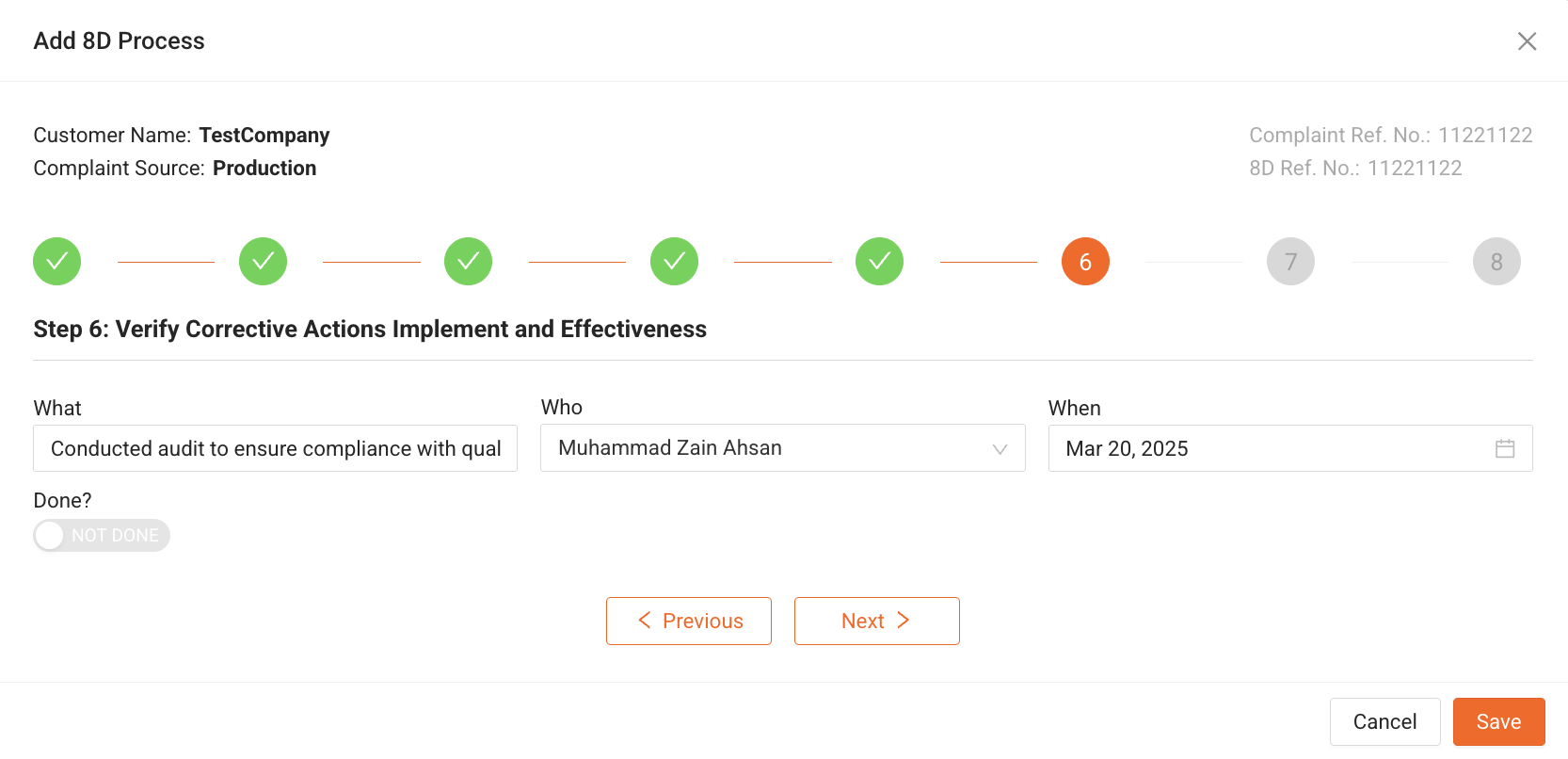
Key Questions for Verification: - What? → What action needs to be verified?
- Who? → Who is responsible for verification?
- When? → When should verification take place?
- Done? → Is the corrective action successfully completed?
Example: Verifying Corrective Actions for a Touchscreen Issue
What? | Action Item | Who? | When? |
Implement routine calibration checks | Weekly verification of touchscreen calibration | Production Supervisor | March 20, 2025 |
Supplier audit | Conducted audit to ensure compliance with quality standards | Supply Chain Manager | March 25, 2025 |
Operator training | Completed training for touchscreen assembly workers | Training Manager | March 22, 2025 |
SOP Update | New SOP for touchscreen calibration implemented | Quality Engineer | March 24, 2025 |
Example: Verifying Corrective Actions for a Steering Vibration Issue
What? | Action Item | Who? | When? |
Update alignment procedures | New SOPs implemented for wheel alignment | Production Engineer | March 21, 2025 |
Training program | Technicians trained on new alignment procedures | Training Manager | March 25, 2025 |
Equipment maintenance | Weekly calibration of alignment machines started | Maintenance Supervisor | March 22, 2025 |
Effectiveness Monitoring
To determine if the corrective actions are effective, the following metrics should be tracked:
- Defect rate reduction – Are fewer defective products appearing?
- Customer complaints – Has the number of complaints decreased?
- Rework costs – Are fewer resources being spent on fixing defects?
- Audit results – Do internal quality checks confirm the issue is resolved?
Why Verification is Important?
- Ensures Corrective Actions Are Fully Implemented
- Prevents the Problem from Reoccurring
- Validates the Effectiveness of Solutions
- Improves Overall Process Reliability
Step 7: Prevent Recurrence (D7)
The goal of this step is to ensure that the problem does not occur again in the future. It involves implementing preventive measures across all relevant processes, production lines, and facilities. Additionally, steps are taken to protect the customer from any potential recurrence of the issue.
Preventing the Occurrence of the Problem
To eliminate the root cause permanently, we must:
- Strengthen processes, training, and inspections
- Standardize solutions across similar production lines
- Communicate improvements to other facilities
Key Questions for Prevention:
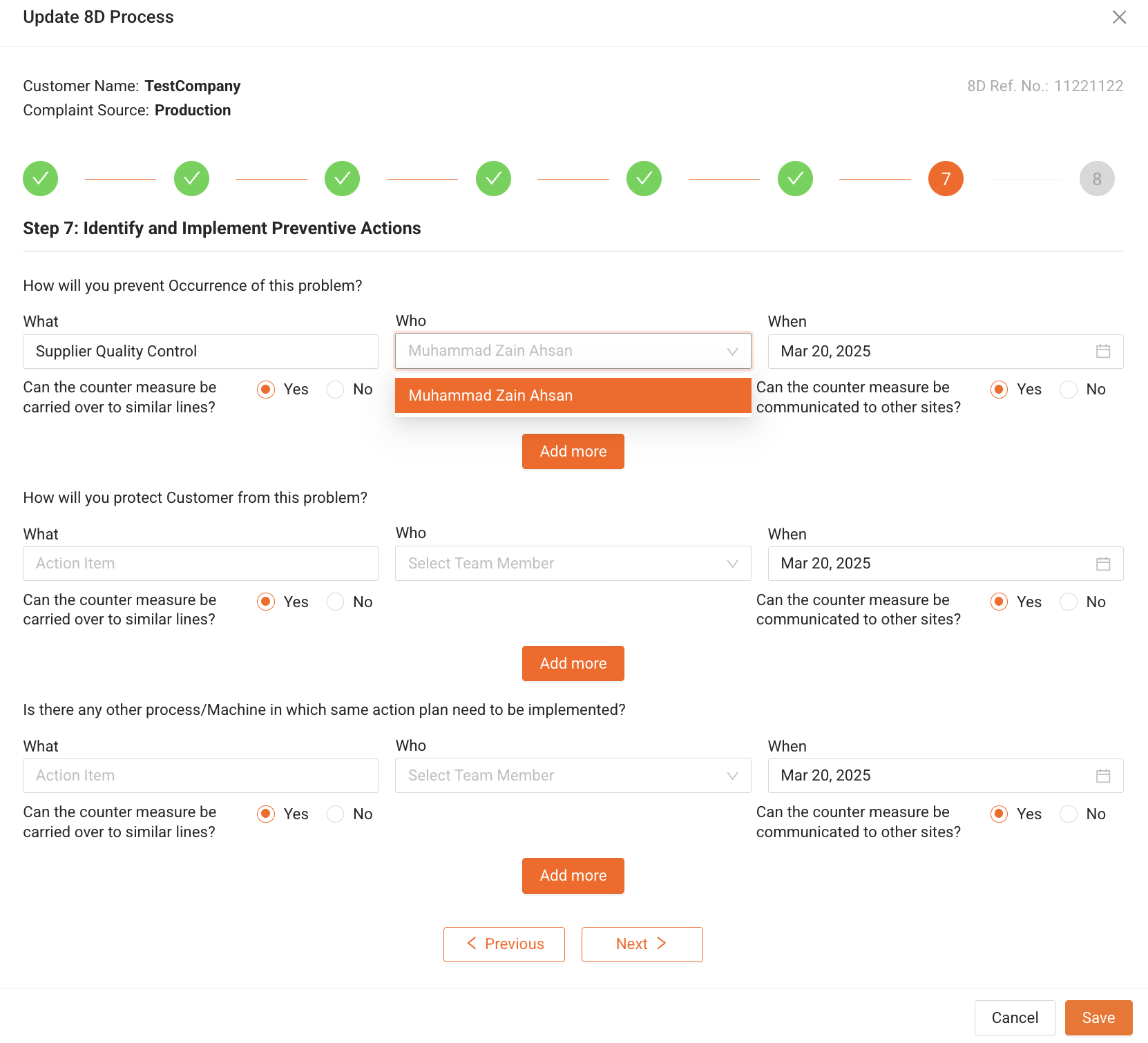
- What? → What preventive action will be taken?
- Who? → Who is responsible for implementing the preventive action?
- When? → By when should it be implemented?
- Can the countermeasure be carried over to similar lines? → Should this be applied to other production lines?
- Can the countermeasure be communicated to other sites? → Should other locations be informed of this solution?
Example: Preventing a Touchscreen Issue in Manufacturing
What? | Action Item | Who? | When? |
Supplier Quality Control | Establish stricter quality checks for touchscreen suppliers | Supply Chain Manager | March 20, 2025 |
Equipment Calibration SOP | Add automated calibration checks before production begins | Maintenance Engineer | March 22, 2025 |
Employee Training | Implement an annual training program for touchscreen assembly workers | Training Manager | March 25, 2025 |
Protecting the Customer from the Problem
Even after implementing preventive actions, customer protection measures ensure that if an issue arises, it is caught before the product reaches the market.
Key Questions for Customer Protection:
- What? → What action will protect the customer?
- Who? → Who is responsible for implementing it?
- When? → By when should it be completed?
- Can this measure be applied to other production lines?
- Can this measure be communicated to other sites?
Example: Customer Protection Measures for Touchscreen Issue
What? | Action Item | Who? | When? |
Final Quality Inspection | Introduce a touchscreen functionality test before shipping | QA Engineer | March 20, 2025 |
Customer Support Policy | Offer free replacements for defective screens within 30 days | Customer Service Manager | March 22, 2025 |
Early Warning System | Develop a real-time defect monitoring system for touchscreen issues | IT Team | March 25, 2025 |
Expanding Preventive Measures to Other Machines & Processes
To further improve manufacturing efficiency and quality, we need to extend successful preventive actions to other related machines and processes.
Key Questions for Expanding the Action Plan:
- What? → What action should be expanded?
- Who? → Who is responsible for implementation?
- When? → By when should it be completed?
- Can this measure be applied to other production lines?
- Can this measure be communicated to other sites?
Example: Expanding Preventive Measures to Other Machines
What? | Action Item | Who? | When? |
Equipment Calibration | Apply auto-calibration checks to other production equipment | Maintenance Lead | March 20, 2025 |
Process Standardization | Implement SOP updates across multiple product lines | Quality Manager | March 22, 2025 |
Supplier Audits | Conduct similar audits for other critical components | Procurement Head | March 25, 2025 |
Why Preventive Actions Are Important?
- Eliminates the risk of recurrence
- Improves overall product quality and reliability
- Reduces customer complaints and warranty claims
- Enhances efficiency across production lines
Step 8: Recognize Team Efforts (D8)
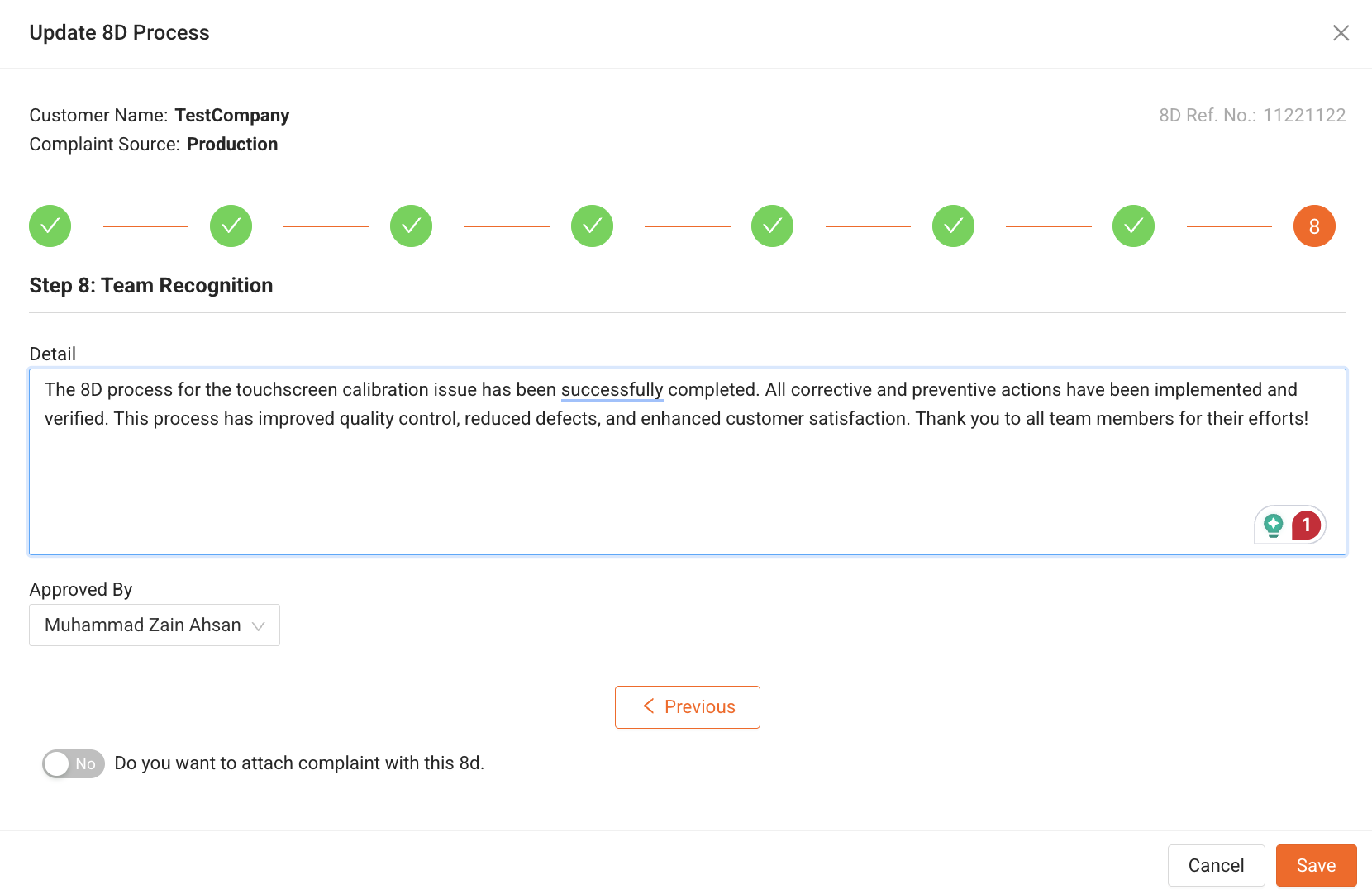
The final step in the 8D Problem-Solving Process is to acknowledge and appreciate the efforts of the team members who contributed to resolving the issue. Recognizing their dedication and hard work fosters a culture of accountability, teamwork, and continuous improvement.
Recognition Details
In this step, we formally document:
- Who contributed to solving the problem?
- What roles they played in the process?
- How their efforts helped in successfully resolving the issue?
- Approval and closing remarks from the leadership team.
Example: Team Recognition for Touchscreen Issue Resolution
Team Member | Role | Contribution |
YASH | Quality Engineer | Conducted root cause analysis and recommended corrective actions |
SIRAJ | Production Manager | Implemented process improvements and ensured proper execution |
Mark Lee | Supplier Manager | Audited suppliers and improved quality control checks |
JONE | Training Lead | Trained operators on new quality control procedures |
SAURABH | Maintenance Supervisor | Ensured equipment calibration and process standardization |
Approval & Final Remarks
After the problem resolution is verified, the team lead or management formally approves the closure of the 8D process.
4. Conclusion
The QA Module in our portal provides a structured approach to managing complaints and ensuring quality improvements.
- The issue is now fully resolved, and preventive actions are in place.
- The 8D report is archived for future reference and learning.
- The team is acknowledged for their contribution.
Was this article helpful?
That’s Great!
Thank you for your feedback
Sorry! We couldn't be helpful
Thank you for your feedback
Feedback sent
We appreciate your effort and will try to fix the article